Blue Mosque in Mazar-i-Sharif, Afghanistan — travel with a tourist e-Visa

Tour Afghanistan

Afghanistan e-Visa 2026

Simple guide for the tourist e-Visa: what it costs, what to upload, and how to fill every step — plus free WhatsApp help from our Kabul team.

Updated 2026-10-30

Visa type

Tourist, single entry

How long you can stay

Up to 30 days

Where you enter

Kabul airport (KBL)

Normal speed

1–4 weeks

Faster option

Express (~1 day)

Passport

Valid 6+ months

The easy way to get your e-Visa

You apply on the official government portal. We help you avoid mistakes — free support for documents, photos, form fields, and your Letter of Invitation.

  1. Step 1

    Get free help on WhatsApp

    Ask us about your nationality, dates, photo, or travel permit. We guide you for free — you still apply on the official portal.

  2. Step 2

    Prepare your documents

    Passport (6+ months), white-background photo, passport scan, and your itinerary details.

  3. Step 3

    Register, wait, then apply

    Create an account on the official e-Visa site. Wait 1–2 days for the activation email, then complete the form and pay.

Free support on WhatsApp

Stuck on a field, photo rejection, or signup wait? Message us — we reply with clear next steps.

Chat for free visa help

Official apply page: eafghans.com/e-visa · Requirements & fees

What the Afghanistan tourist e-Visa is

For most tourists, the online visa is simple: one entry, stay up to 30 days, usually valid for 90 days from issue, and you enter at Kabul International Airport (KBL). Business or other visa types go through an embassy or consulate — not this portal.

Fees and rules can change, so always double-check the official portal before you pay. Planning the full trip? See our travel guide.

How much it costs (and how fast)

You pay twice: a small initial fee when you submit, then the main visa fee after approval. Pick Standard (cheaper, 1–4 weeks) or Express (faster, about 1 business day, higher fee).

Afghanistan e-Visa fee stages for Standard and Express processing
Stage Standard Express
Initial fee (48 hours to pay) ~USD 8.25 ~USD 8.25
Remainder — most nationalities ~USD 123.71 ~USD 175.26
Remainder — USA ~USD 206.19 ~USD 257.73
Typical processing time 1–4 weeks Up to 1 business day
  • • Initial fee is non-refundable. Miss the 48-hour window and the file closes.
  • • Remainder is due within 7 days of approval or the application is cancelled.
  • • Express adds about USD 50 express fee on the remainder (included in totals above).
  • • Tour packages from us do not include government/portal visa fees.

What you need before you start

  • • Passport valid at least 6 months beyond travel
  • • Colour passport-style photo on a plain white background (45 × 35 mm)
  • • Clear scan of the passport biodata page
  • • National ID or residence permit copy (if applicable)
  • • Supporting documents such as itinerary or accommodation proof (optional but helpful)

Travel permit within 6 hours

Photo rules (read this before you upload)

A bad photo is the #1 delay. Use a clear studio-style portrait on a white background. The portal checks lighting, background, and head position automatically. Upload only your face photo here — not your passport.

  • • Printed or digital colour photo with a plain white background
  • • Size commonly 45 × 35 mm; head height about 25–35 mm from chin to crown
  • • Taken within the last 6 months; full-face view, looking at the camera
  • • Neutral expression, both eyes open; no glasses; hair must not cover the face
  • • Avoid white clothing or a white scarf that blends into the background
  • • High-resolution, sharp, no blur or heavy shadows on the face
  • • Upload a portrait only — never your passport or ID into the photo check tool

Create your account — then wait

Sign up on the official portal with your email. This part confuses many people: you usually cannot start the visa form the same day.

Wait 1–2 days

After sign-up, wait for an email that says you can use the visa portal. Then log in and apply. Check spam if it is late.

Fill the form — each screen explained

Once your account is active, follow the screens below. Copy names and numbers exactly from your passport. If a field is unclear, WhatsApp us before you submit.

01

Check if you can apply online

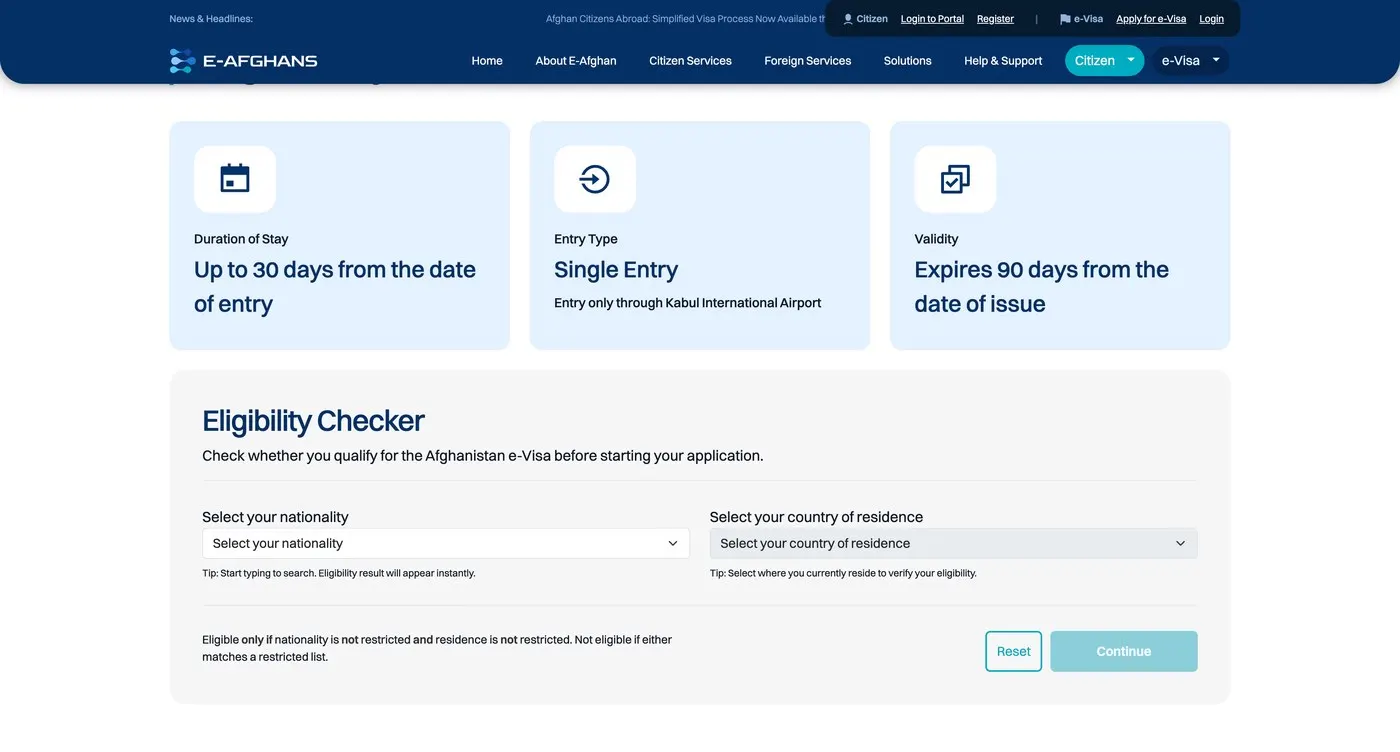
On the official site, open the eligibility checker. Pick your nationality and country of residence. Only continue if it says you are eligible.

  • • Select nationality (type to search)
  • • Select country of residence
  • • Continue only if the result shows you are eligible
Afghanistan e-Visa eligibility checker for nationality and residence
If either nationality or residence is restricted, the online tourist e-Visa may not be available.

02

Create your portal account

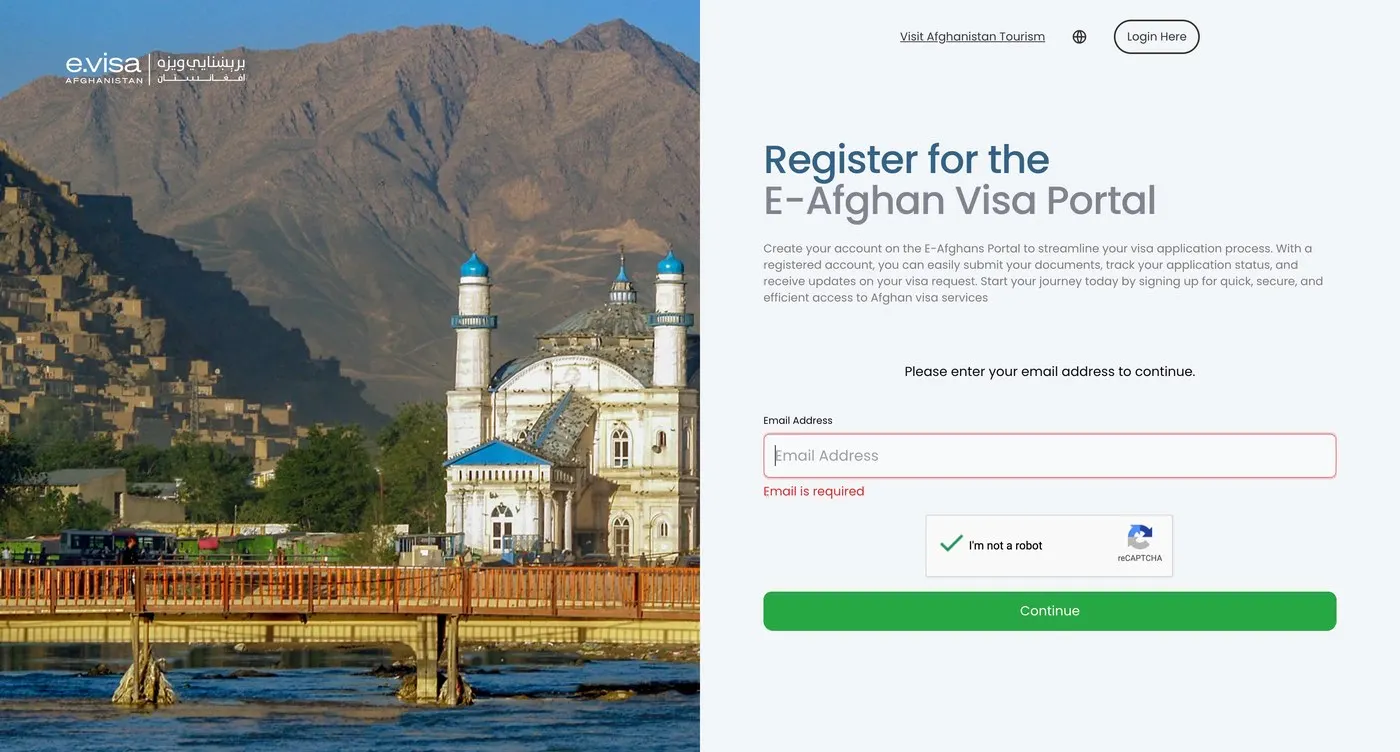
Register with a real email you check every day. After signup, you usually cannot open the full visa portal until activation.

After sign-up, wait about one or two days for an email saying you can use the portal. Trying to apply immediately often fails until that email arrives.
  • • Enter your email address
  • • Complete the CAPTCHA and continue
  • • Wait for the activation email (often 1–2 days)
  • • Check spam/junk if nothing arrives, then log in
Register for the Afghanistan e-Visa portal with email address
Registration screen — wait for the activation email before applying.

03

Step 1 — Start the visa application form

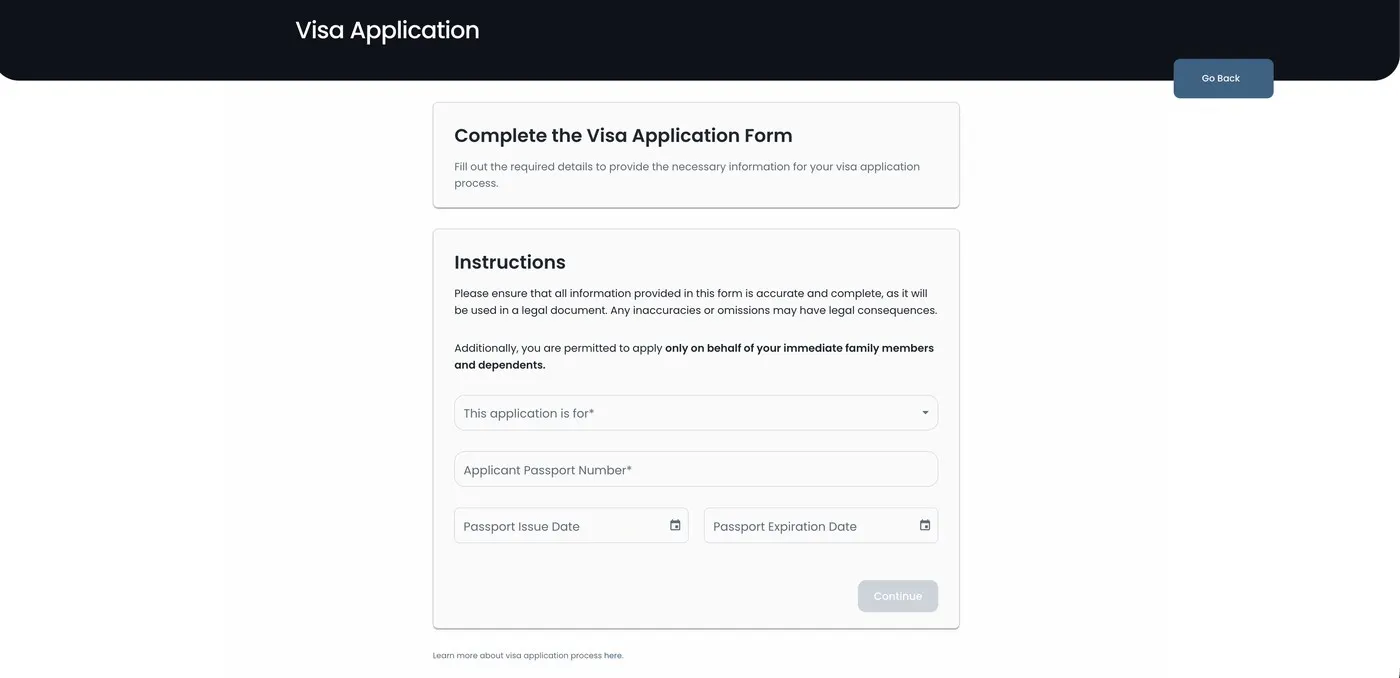
Begin a new application with passport identity fields. Passport validity of at least 6 months is required.

  • • This application is for* — usually Myself (immediate family/dependents only if applying for others)
  • • Applicant passport number*
  • • Passport issue date
  • • Passport expiration date — must remain valid 6+ months
Afghanistan e-Visa step 1 application form with passport number and dates
Step 1 — applicant and passport validity fields.

04

Step 2 — Photo & identification documents

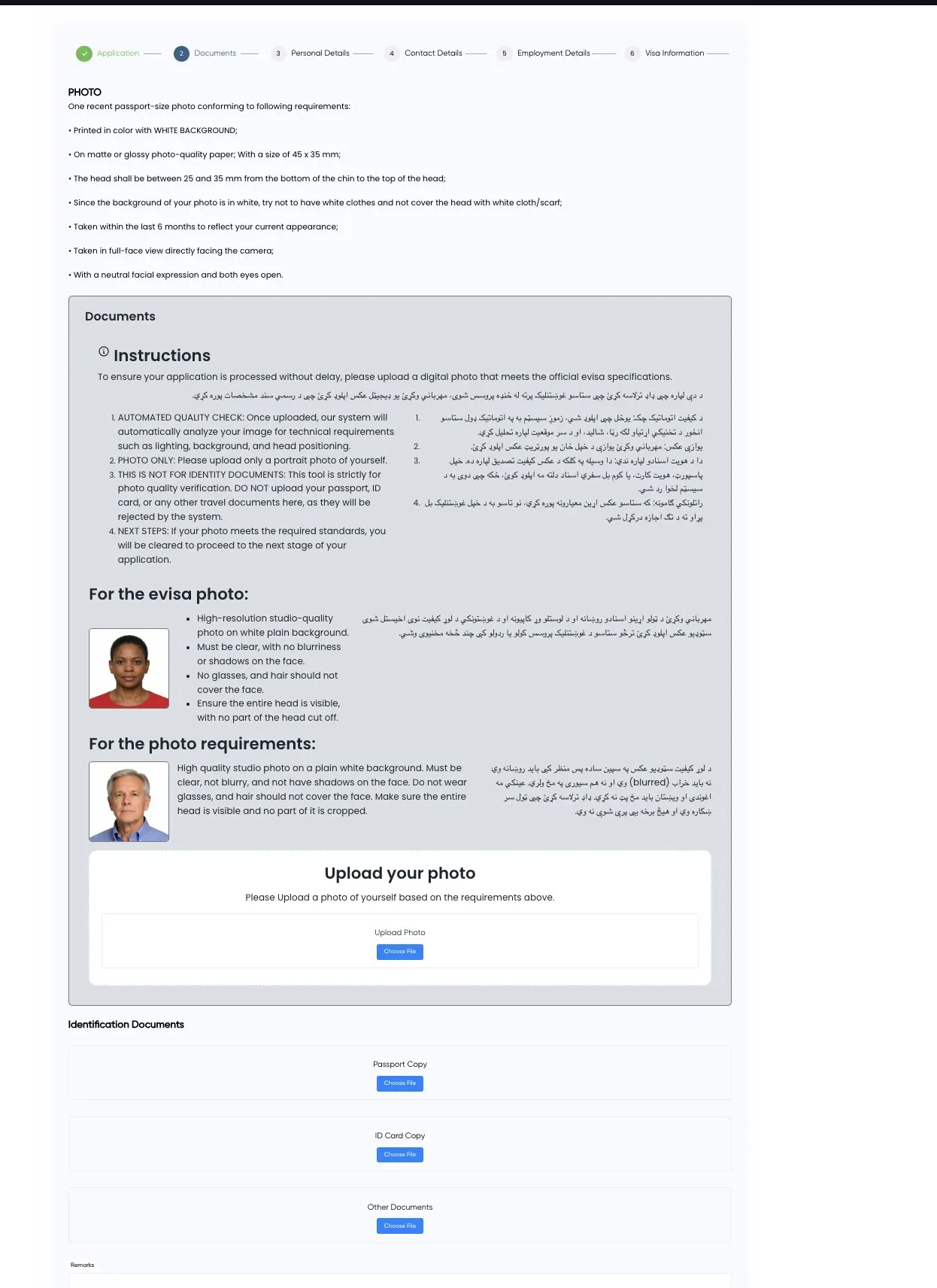
Upload a compliant portrait for automated quality checking, then passport and other IDs. Files: JPG, PNG, or PDF, under 50 MB each.

  • • Upload photo — portrait only, white background, meets size/face rules
  • • Passport copy — biodata page, clear and readable
  • • ID card copy — national ID or residence permit if applicable
  • • Other documents — itinerary, hotel letter, LOI, etc.
  • • Remarks — optional notes for the reviewer
Afghanistan e-Visa step 2 photo and document upload screen
Step 2 — photo verification and document uploads.

05

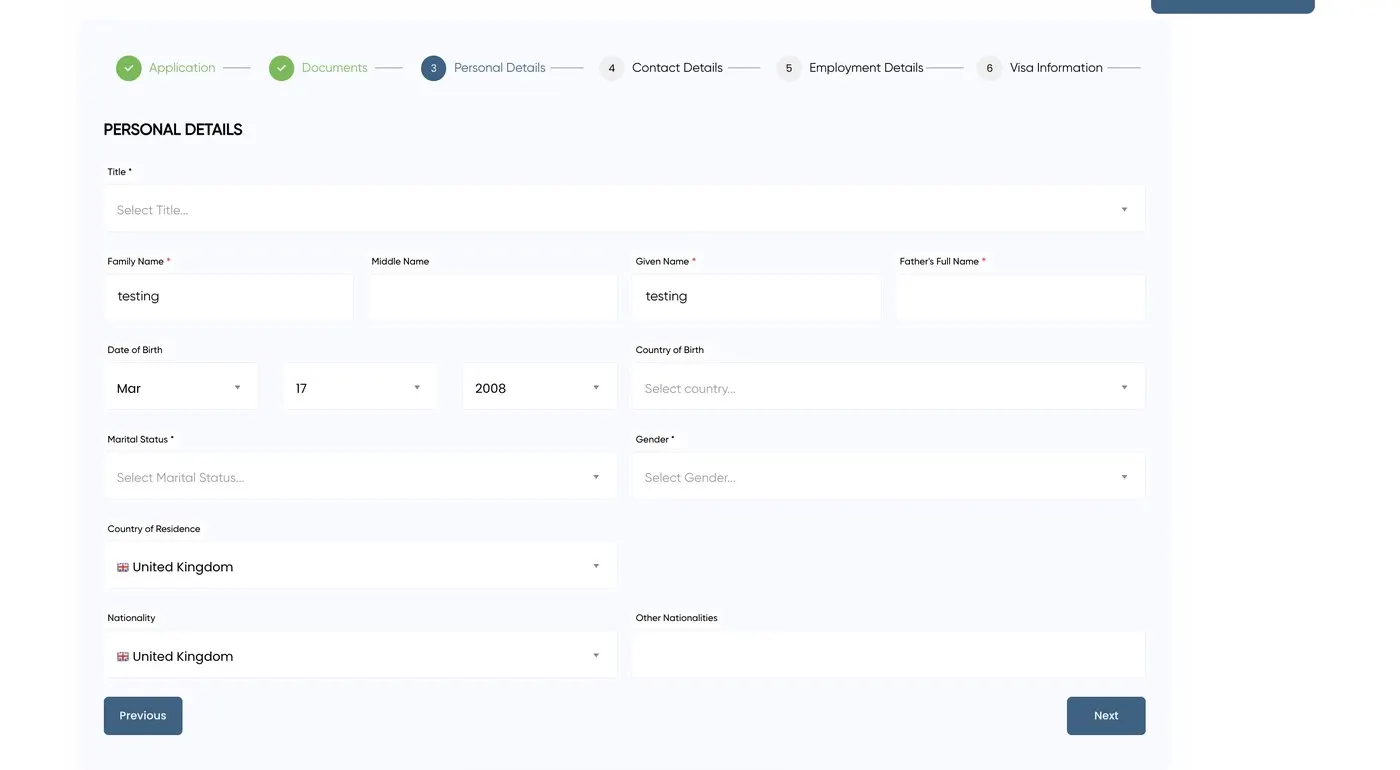
Step 3 — Personal details

Enter names exactly as printed in the passport. Mistakes here delay or reject applications.

  • • Title*
  • • Family name* / Given name* / Middle name (if any)
  • • Father’s full name*
  • • Date of birth
  • • Country of birth
  • • Marital status*
  • • Gender*
  • • Country of residence
  • • Nationality
  • • Other nationalities (if applicable)
Afghanistan e-Visa step 3 personal details form fields
Step 3 — personal details matching your passport.

06

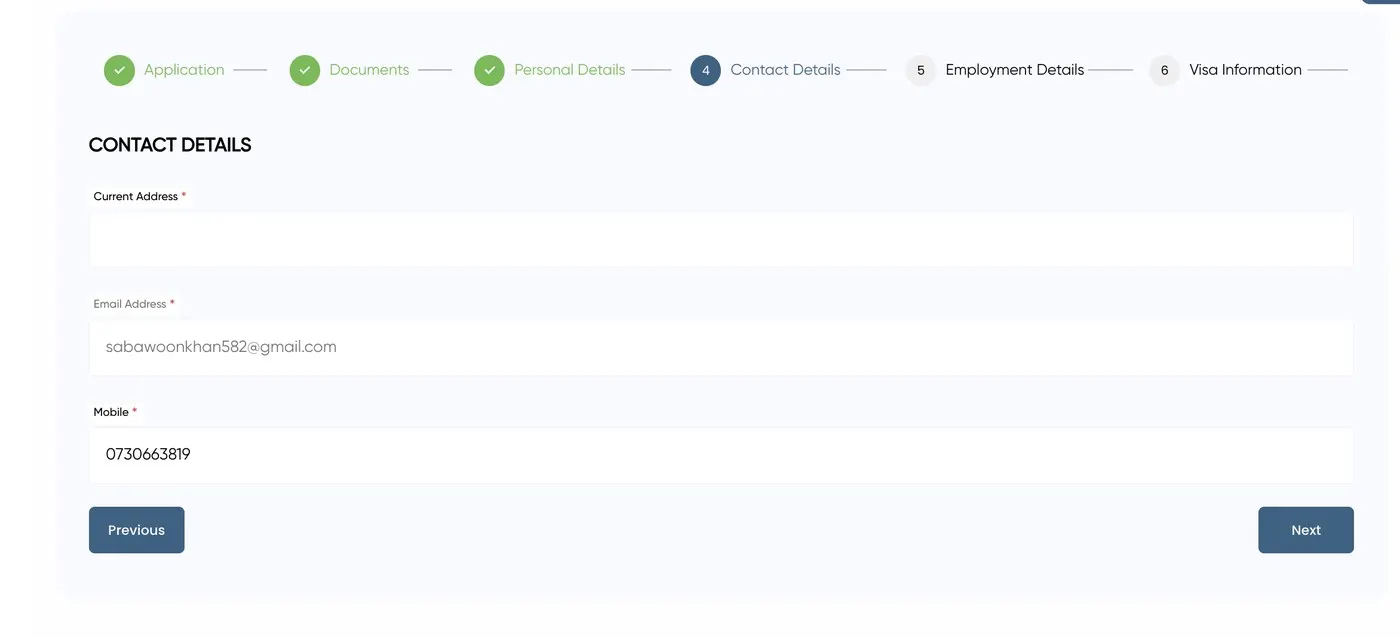
Step 4 — Contact details

Use an email and mobile you monitor daily — payment links and status updates arrive here.

  • • Current address*
  • • Email address*
  • • Mobile*
Afghanistan e-Visa step 4 contact details address email and mobile
Step 4 — address, email, and mobile.

07

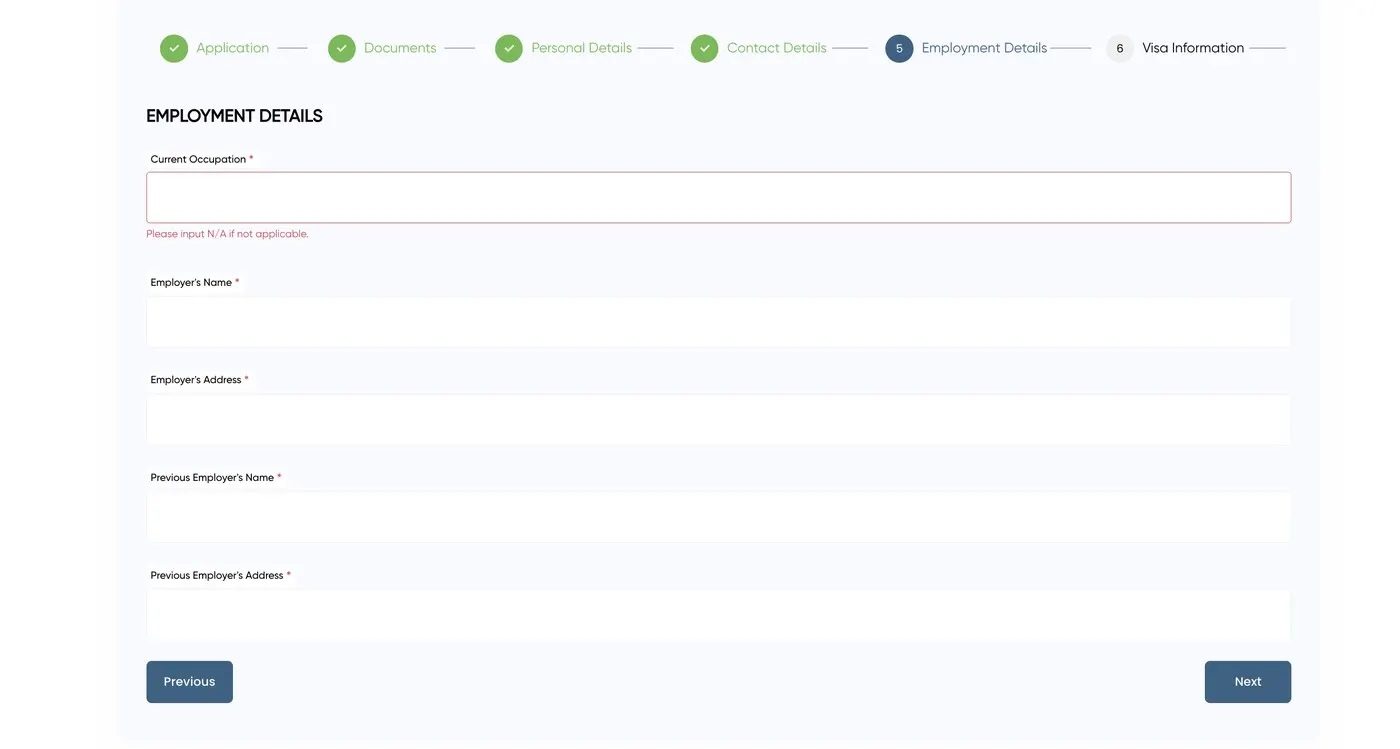
Step 5 — Employment details

All employment fields marked required must be completed, including previous employer when asked.

  • • Current occupation*
  • • Employer’s name*
  • • Employer’s address*
  • • Previous employer’s name*
  • • Previous employer’s address*
Afghanistan e-Visa step 5 employment details form
Step 5 — current and previous employment.

08

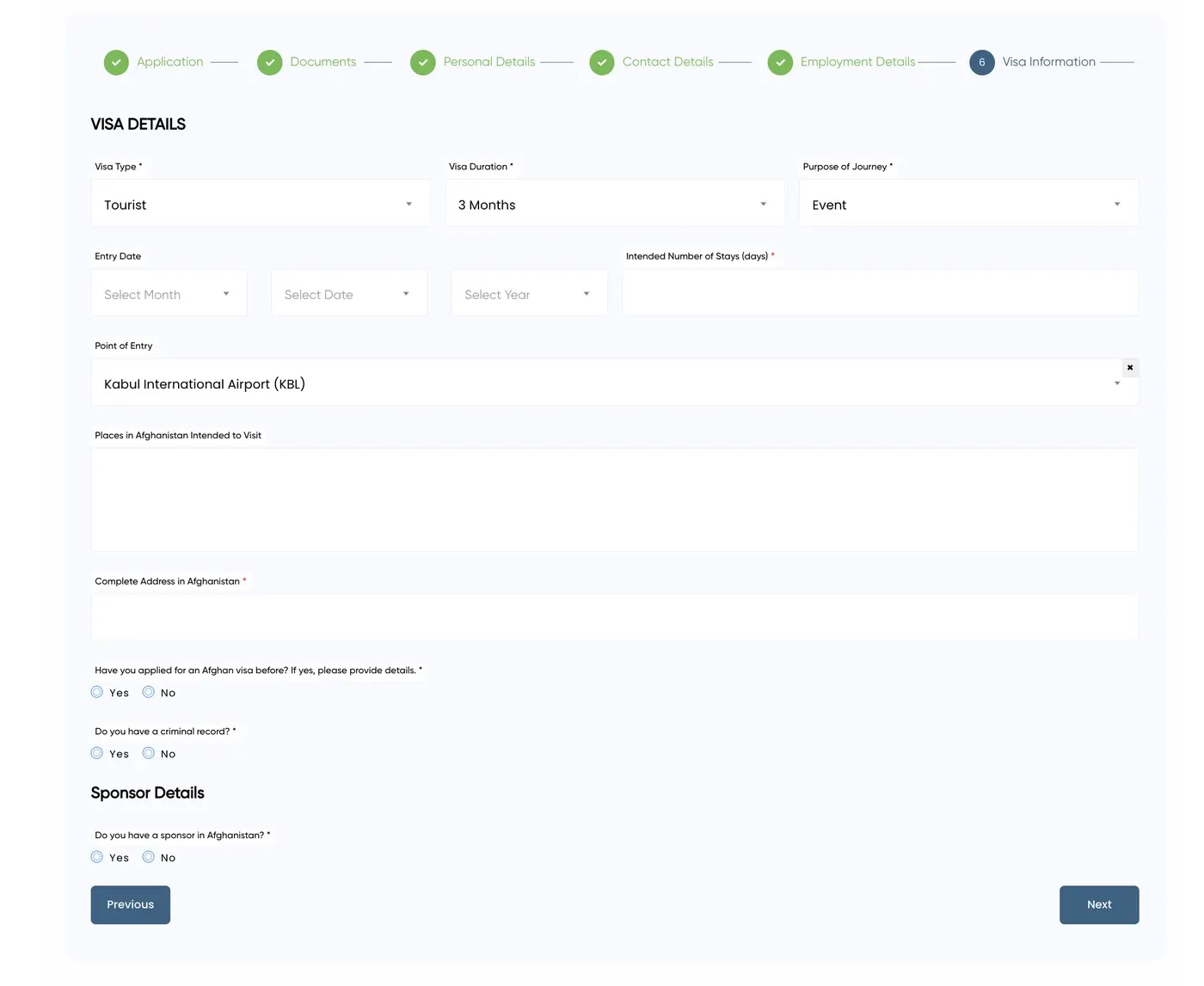
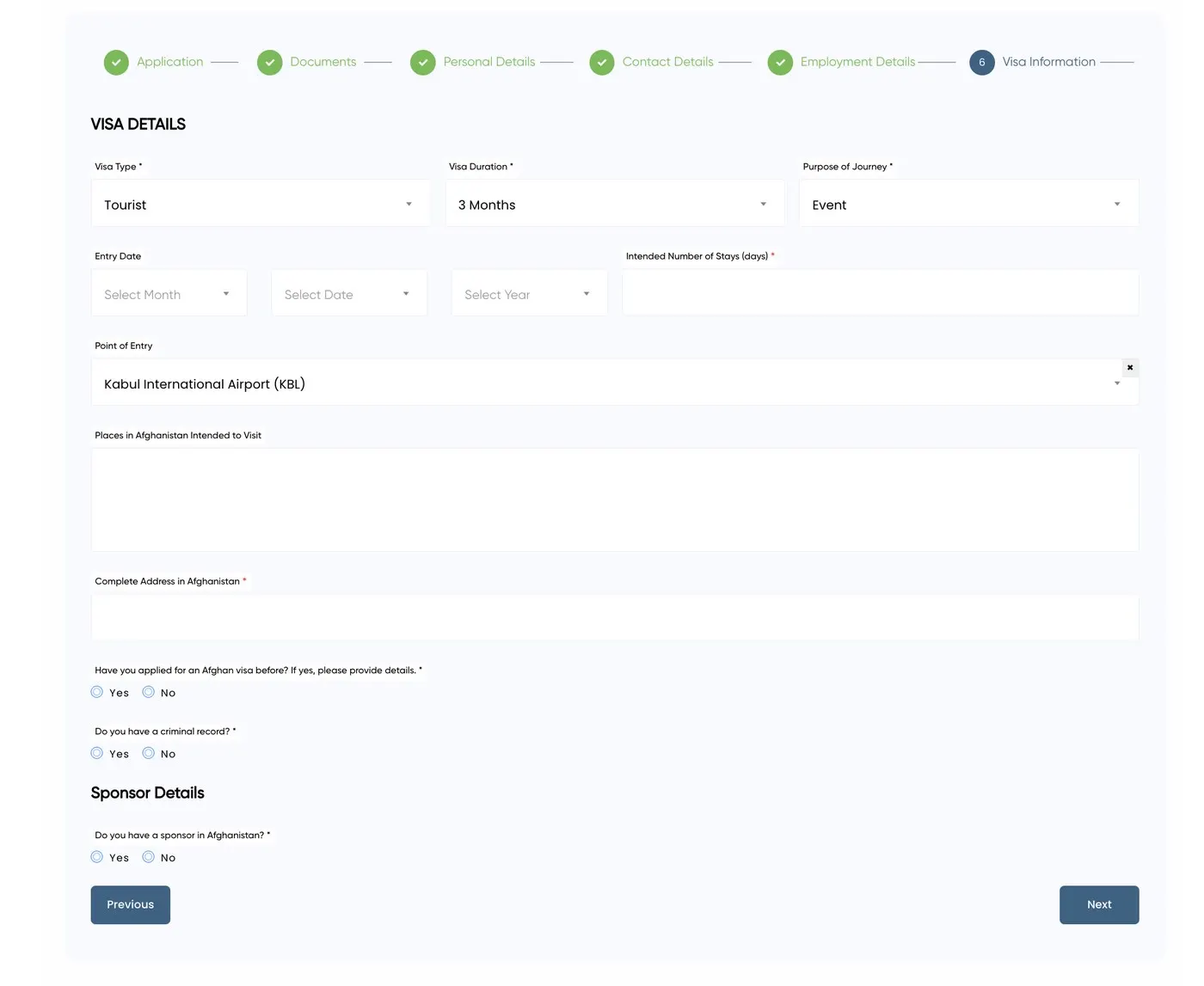
Step 6 — Visa information

For tourism, select Tourist and use holiday (or the closest tourist purpose). Point of entry is almost always Kabul International Airport (KBL).

  • • Visa type* — Tourist
  • • Visa duration* — as offered (tourist stay up to 30 days)
  • • Purpose of journey* — holiday for tourist travel (or friend/family/event/other when accurate)
  • • Entry date
  • • Intended number of stays (days)*
  • • Point of entry — Kabul International Airport (KBL)
  • • Places in Afghanistan intended to visit
  • • Complete address in Afghanistan*
  • • Have you applied for an Afghan visa before?*
  • • Do you have a criminal record?*
  • • Do you have a sponsor in Afghanistan?* — often Yes when travelling with a licensed operator
Afghanistan e-Visa step 6 tourist visa information and entry details
Step 6 — tourist visa details, entry date, and sponsor answers.

09

Step 7 — Passport details

Re-confirm passport data. Numbers and dates must match the biodata page scan exactly.

  • • Passport type* — usually Ordinary
  • • Passport number*
  • • Place of issue*
  • • Passport issue date
  • • Passport expiry date
Afghanistan e-Visa step 7 passport details form
Step 7 — passport type, number, and dates.

10

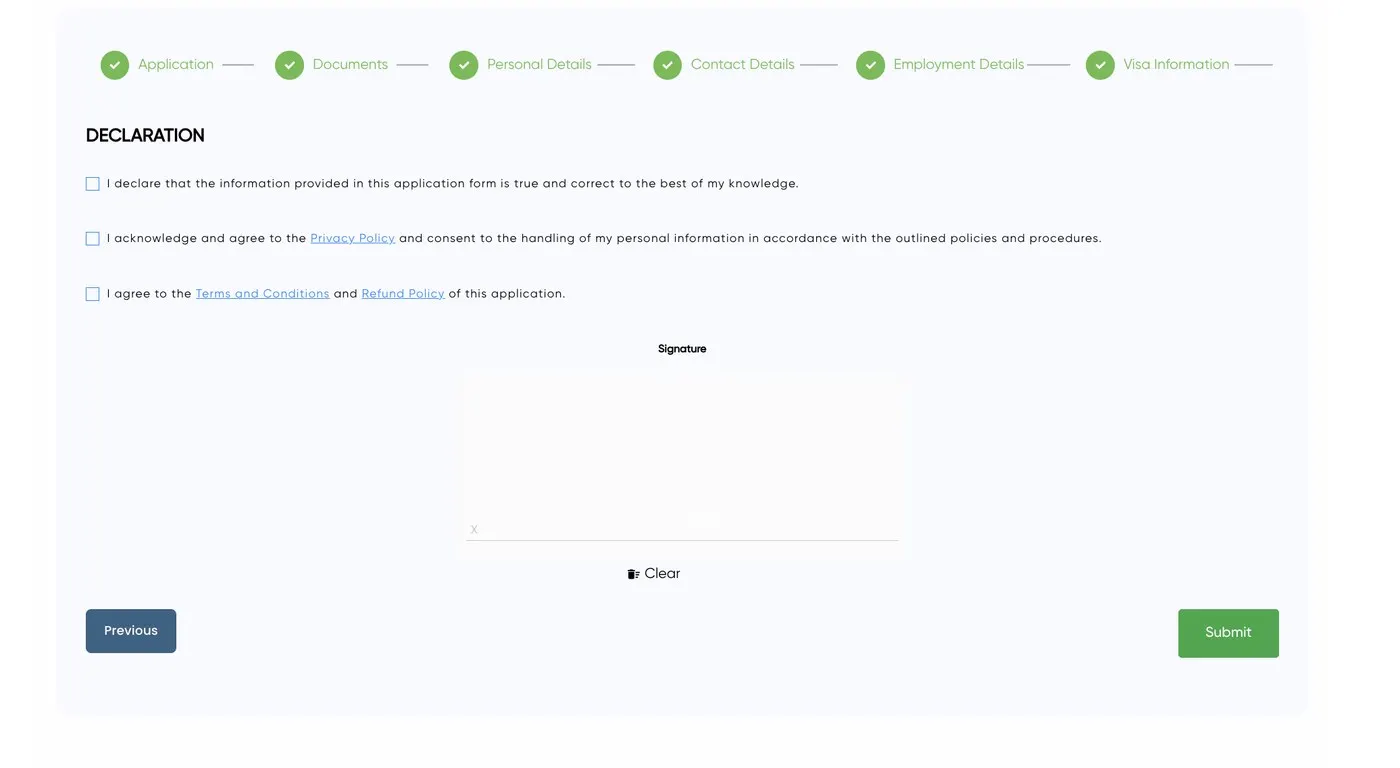
Step 8 — Declaration & signature

Confirm truthfulness, privacy consent, and terms before submitting.

  • • Declare information is true and correct
  • • Acknowledge Privacy Policy
  • • Agree to Terms and Conditions and Refund Policy
  • • Signature
Afghanistan e-Visa step 8 declaration and signature
Step 8 — declaration checkboxes and signature.

11

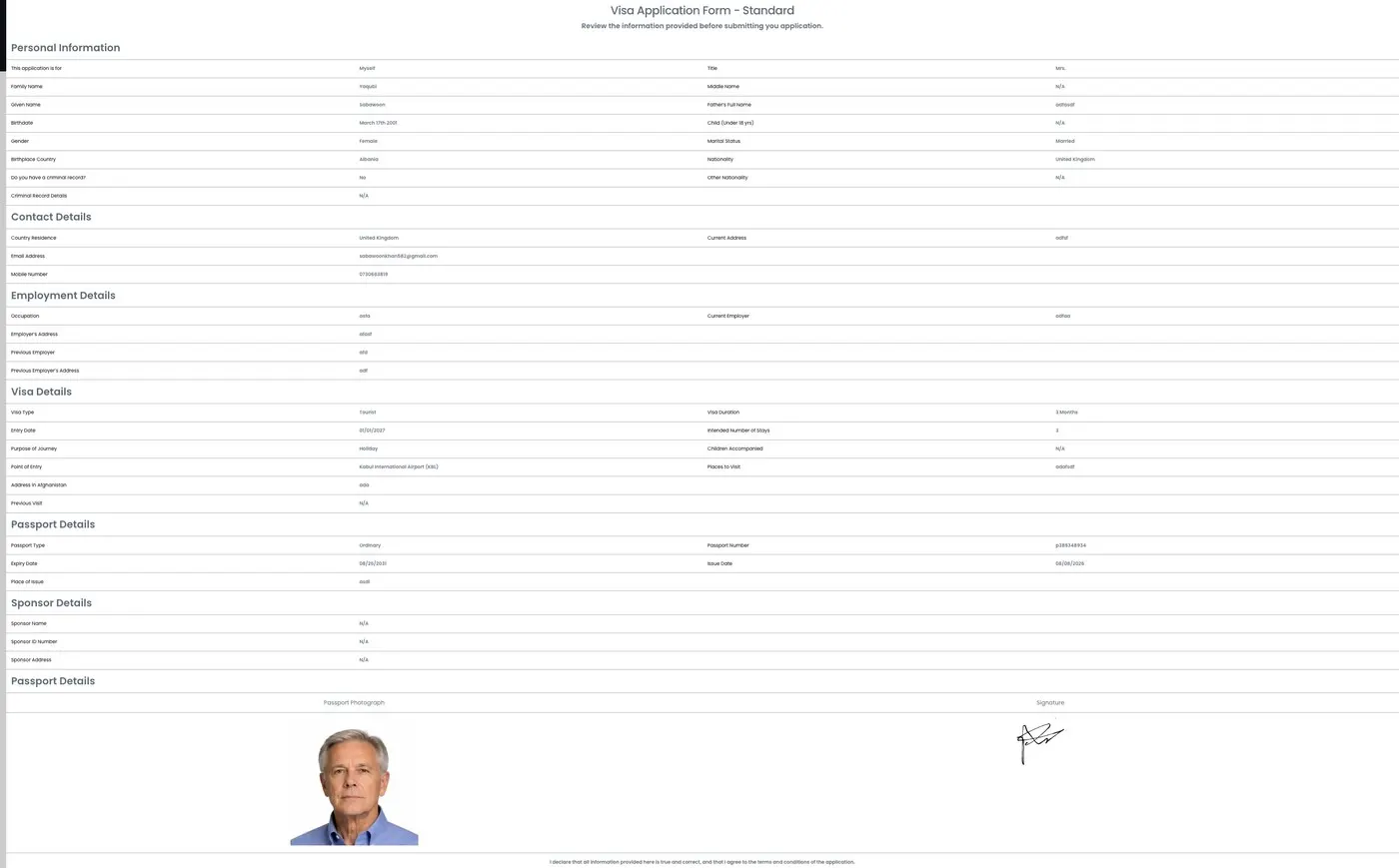
Step 9 — Verify information, then submit

Review every field on the summary page. When everything matches your passport, click Submit. After this, the portal emails you a payment link for the initial fee.

  • • Check names, passport number, and dates against the passport
  • • Confirm photo and signature look correct
  • • Read the declaration at the bottom
  • • Click Submit only when everything matches
Afghanistan e-Visa step 9 verify information screen before submit
Step 9 — review the full application, then submit.

12

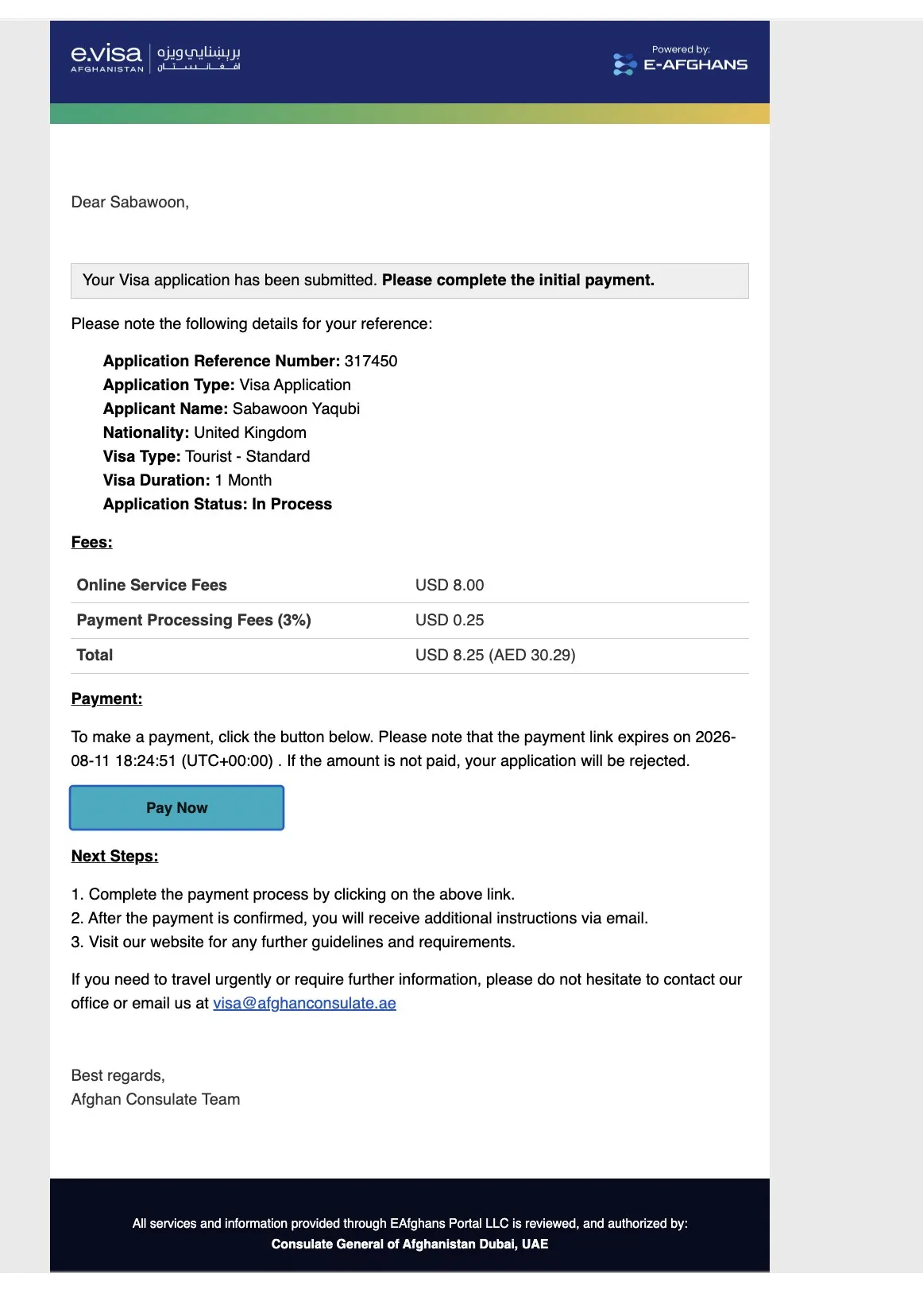
Step 10 — Payment email after submit

Right after you submit, you receive an email from the e-Visa system asking you to complete the initial payment. Open it, check your application reference, and click Pay Now before the link expires.

This email is the normal next step after Verify & Submit. Pay the initial fee first; the larger remainder fee comes later, after approval.
  • • Email subject/status: application submitted — complete the initial payment
  • • Note your application reference number
  • • Confirm visa type (e.g. Tourist — Standard) and fee total (~USD 8.25)
  • • Click Pay Now before the expiry time in the email
  • • If you do not pay in time, the application can be rejected and you must reapply
  • • Check spam/junk if the email does not arrive quickly
Afghanistan e-Visa payment email with Pay Now link after application submit
Step 10 — payment email with Pay Now for the initial fee.
Free help with a form field

We walk you through screenshots before you pay.

Pay, track, then download

After Step 9 (verify & submit), you get an email with a Pay Now link for the small initial fee. Pay within the deadline (usually about 48 hours), wait for a decision, then pay the main fee within 7 days of approval and download the PDF in colour.

Open the Pay Now email

After Step 9 submit, your inbox gets the payment email. It shows your reference number, fee breakdown (~USD 8.25), and a Pay Now button with an expiry deadline.

Afghanistan e-Visa initial payment email with application reference and Pay Now button

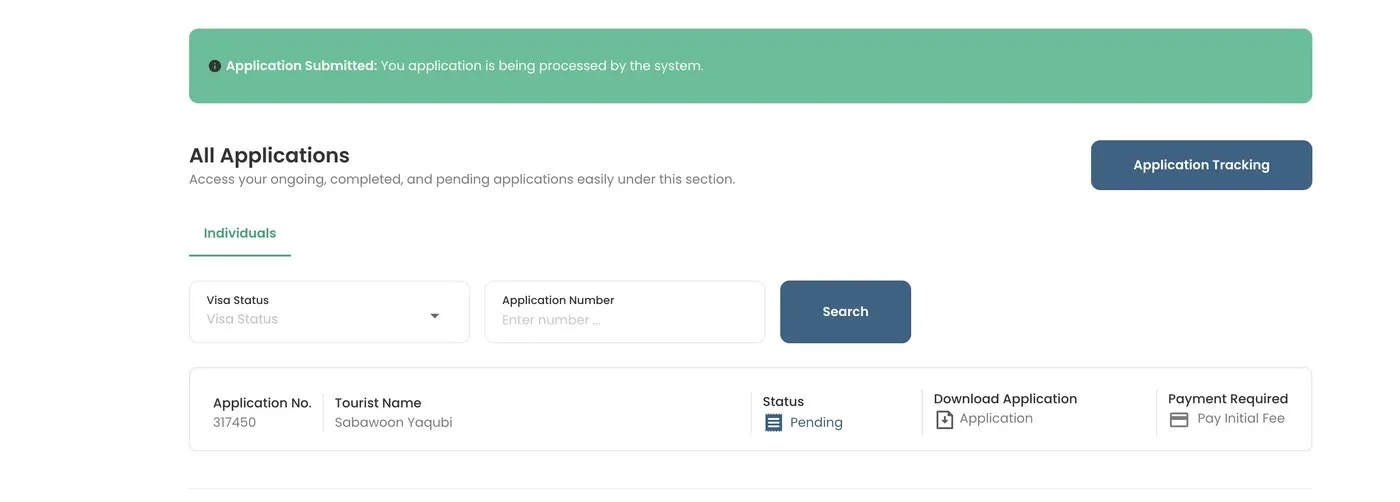
Pending payment in the portal

Your dashboard may also show payment pending. You typically have 48 hours for the initial fee — miss it and the file can close.

Afghanistan e-Visa pending payment status after submit

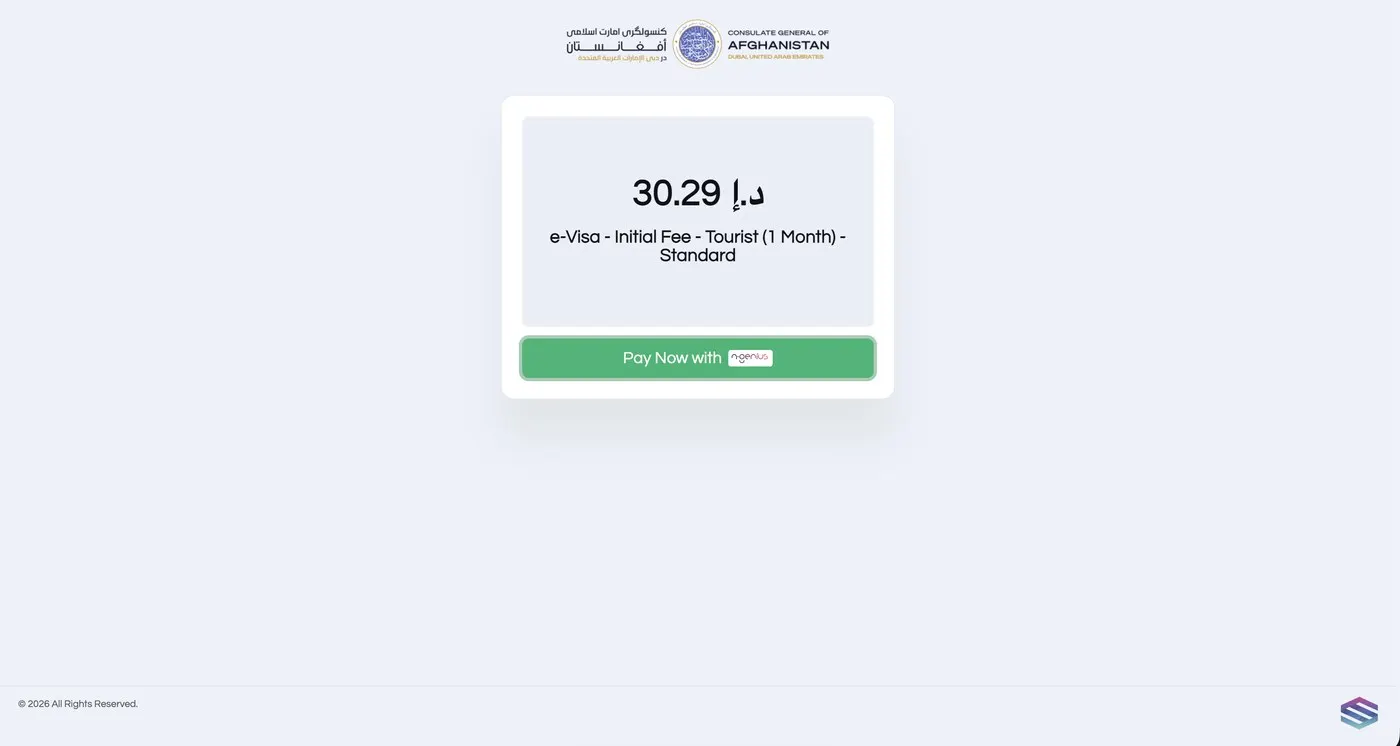
Complete checkout

Pay via the email link or portal. Cards accepted: Visa, Mastercard, American Express. Amounts may convert to AED.

Afghanistan e-Visa payment page for initial fee

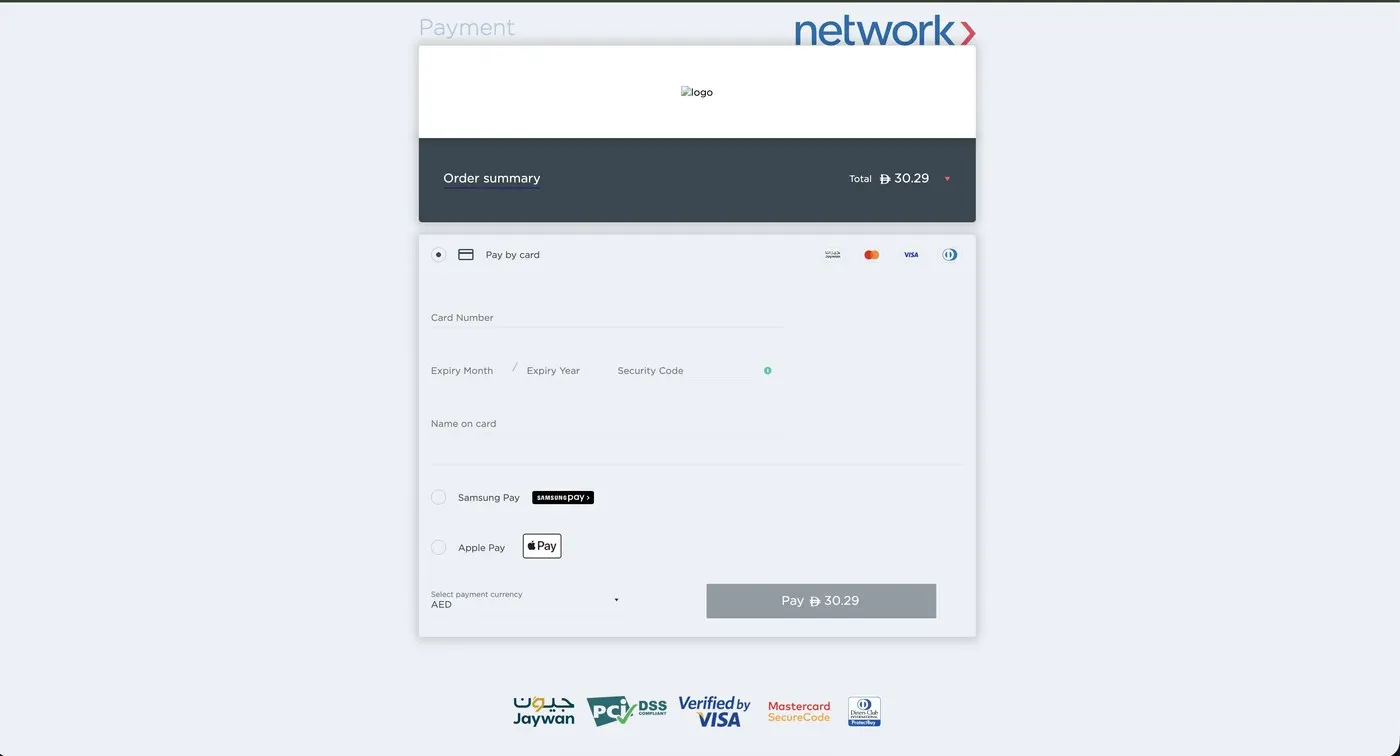
Card form & receipt

Finish the secure checkout. Keep the digital receipt emailed after a successful payment.

Afghanistan e-Visa secure payment checkout form

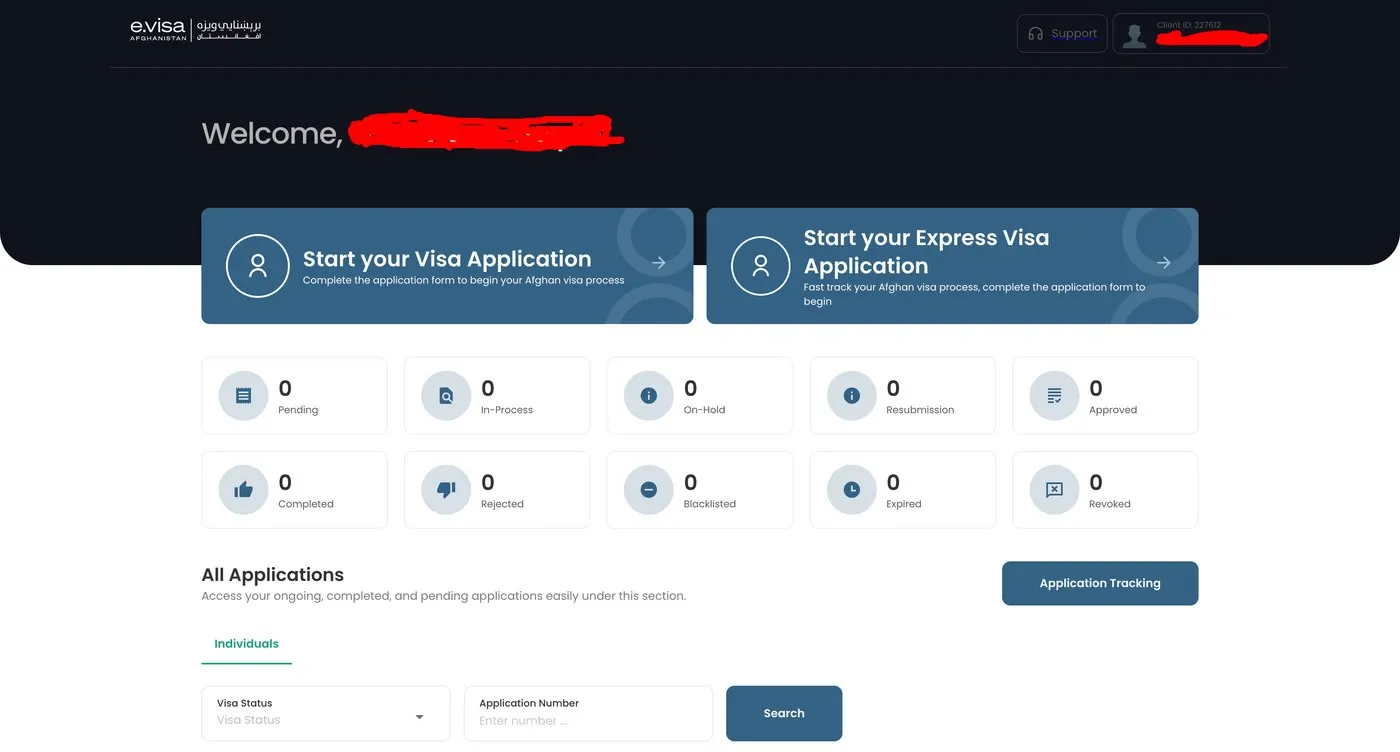
Track status on the dashboard

Watch Standard (1–4 weeks) or Express (~1 business day) progress. After approval, pay the remainder within 7 days, then download the PDF visa.

Afghanistan e-Visa portal dashboard showing application status

After approval

  • • Pay the remainder fee within 7 days
  • • Download the e-Visa PDF from the dashboard (and keep the email copy)
  • • Print in colour for check-in and KBL arrival
  • • Carry your itinerary and travel permit as advised for your trip

Free visa support & travel permit

Message us anytime for free application guidance — photo checks, confusing fields, Standard vs Express, or payment timing. When you book a trip with us, we arrange your travel permit — usually within 6 hours — so your on-ground paperwork matches your itinerary. You still submit and pay for the e-Visa on the official portal.

Related guides

Afghanistan e-Visa FAQ

All FAQs →
Do I need a Letter of Invitation for the Afghanistan e-Visa? +
An LOI from a licensed tour operator is strongly recommended. It reduces rejection risk and gives authorities a verified sponsor and itinerary. We issue yours after you confirm booking, usually within 48 hours.
Where can I enter with an Afghanistan e-Visa? +
The tourist e-Visa is typically for single entry through Kabul International Airport (KBL). Rules can change — we confirm current entry points when you book.
What is the difference between Standard and Express processing? +
Standard processing usually takes 1–4 weeks. Express (VIP) processing is typically up to 1 business day for complete applications and adds an express fee on the remainder payment. Timelines apply only when documents are clear, complete, and do not need further review.
How much does the Afghanistan tourist e-Visa cost? +
Fees are paid in two stages: an initial online service fee (about USD 8.25, due within 48 hours, non-refundable), then a remainder fee after approval (due within 7 days). Remainder totals are commonly about USD 123.71 for most nationalities on Standard (about USD 206.19 for USA) and about USD 175.26 Express for most nationalities (about USD 257.73 for USA). Always confirm live amounts on the official portal.
Why can I not log into the visa portal right after signing up? +
After registration you often must wait one or two days for an activation email before full portal access. Check spam/junk folders. Once you receive confirmation, you can log in and start the application.
What photo do I need for the Afghanistan e-Visa? +
Upload a recent colour passport-style photo on a plain white background (commonly 45×35 mm), full face, neutral expression, both eyes open, no glasses, hair not covering the face, taken within the last 6 months. Do not upload your passport into the photo verification tool — that step is for a portrait photo only.
What e-Visa types are available online? +
The online portal currently issues a single-entry Tourist e-Visa for stays up to 30 days, typically valid for 90 days from the date of issue. Other visa types are handled through an Afghan embassy or consulate.
Are Afghanistan e-Visa fees refundable? +
The initial fee is non-refundable. Once the e-Visa is issued, the remainder fee is generally not refundable. Refund requests are subject to verification by the Afghan Consulate under the portal refund policy.
What payment methods does the e-Visa portal accept? +
The official portal accepts Visa, Mastercard, and American Express. Payments may be converted to UAE Dirhams (AED) at processing. You receive a digital receipt by email.
Where do I download my approved Afghanistan e-Visa? +
Download the PDF from your visa portal dashboard. A copy is also emailed. Print a colour copy for airline check-in and immigration at Kabul.
How does Tour Afghanistan help with the e-Visa? +
We are a licensed Kabul-based tour operator. We issue your Letter of Invitation after booking, guide you through documents and portal steps, and arrange your itinerary. Applications and payments are completed on the official e-Visa portal — we do not replace that portal.

100% free · no obligation

Get your free itinerary

Tell us what you want to see. We’ll follow up with a fixed quote and available dates.

Fields marked * are required.

We only use your details to respond to your itinerary request — no spam, never shared.

No deposit to start planning · clear quote before you commit

or get an instant reply
Message us on WhatsApp